
I just discovered and tried something new on my BlackBerry and I thought I would share it with you all. If you transfer a JAR (JAVA) file to the media card or memory of your device using either mass storage mode or desktop manager you will be able to install the file from your BlackBerry. This is very useful for people who do not have data plans or have a MAC and want to install JAR and Java games. It is now very easy to try out the many free games at GetJar.com by just copying them to your memory card. Just follow the instructions below once you have moved the JAR file to your BlackBerry. I have tried this with COD files without much success but maybe… Keep in mind that you only need the JAR files. The JAD files are of no use to you.
Open the media manager and click the menu button:
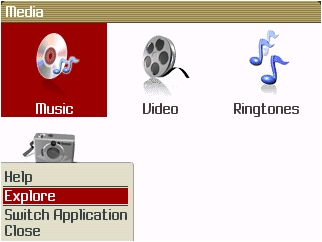
Then select explore and find the JAR file on your BlackBerry
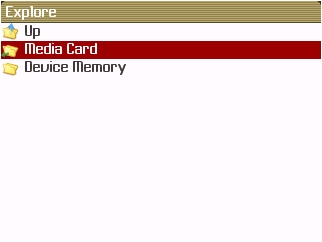

You then click on the JAR file and you will be shown the installation prompt just like you would if you installed the application OTA


javatyger Not Registered
Posted: June 14, 2008 at 8:01 PM EST
No go – did this and put a theme I wanted which is a .jad into a folder, explored to it, then it clicked it. Download window came up, tried to install and get a 907 Invalid COD. 🙁
douglas Not Registered
Posted: April 21, 2009 at 11:23 AM EST
i also get the 904 code how do you fix this
drob Not Registered
Posted: October 3, 2008 at 4:54 AM EST
it works…these idiots cant follow directions
matthew Not Registered
Posted: October 19, 2008 at 9:25 AM EST
I have look all over the internet for how to do this. Thank you for posting this.
Jagmeet Singh Not Registered
Posted: October 23, 2008 at 3:36 AM EST
This will definitely work because JAR files are the actual program, where as the JAD files just have the install time settings and point to the JAR file. If you would open a JAD file it can be read in any text editer you will get a better idea.
Julie Not Registered
Posted: November 1, 2008 at 8:59 PM EST
I too found this out. However, I did this on my own. The directions are correct and work wonderfully b/c this is how I installed a game since my port no longer works. I just bought a card and upload to it. Thanks!!
jkmora Not Registered
Posted: December 18, 2008 at 10:47 PM EST
Thank you!!! very easy, stupid proof
mrsmoss3791 Not Registered
Posted: January 9, 2009 at 11:36 AM EST
This method does not work…..it tells me download failed each time……
jneezy Not Registered
Posted: January 10, 2009 at 9:23 AM EST
Installed just fine on my 8330 using this method. controls are weird though.
Me Not Registered
Posted: January 13, 2009 at 1:20 PM EST
Yeah Baby!!!
I’ve been looking for this FOREVER!!!
Thanks!!!!!!!!!
************************
Edit: ohhhh, noooooo:
“907 Invalid JAR Error”.
Damn it. almost…..
Tomato Not Registered
Posted: March 18, 2009 at 7:10 PM EST
Thanks a lot! That really helped. Especially if you just got your BB and you don’t have memory card.
Ryan Not Registered
Posted: June 19, 2009 at 9:23 PM EST
This makes sense and I can find the .jar file on my 8100 (os v4.2) but it just tells me it can’t open it. It doesn’t seem to understand it’s an executable
tony Not Registered
Posted: June 20, 2009 at 7:34 PM EST
I have having the same problem, tells me it cant open the file, WTF
tony Not Registered
Posted: June 20, 2009 at 7:39 PM EST
I am having the same problem, keeps telling me cant open the file, need help, going back to iraq in a couple of days