
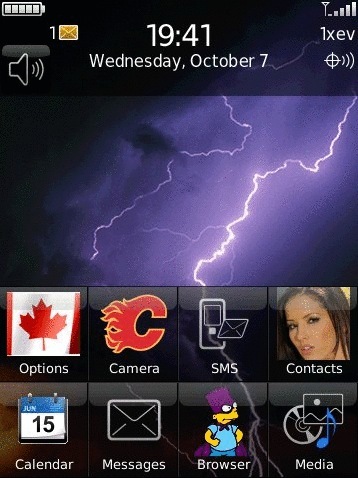
 ToySoft let me know that they have just released magicIcon. This is a unique app that lets you change the system or 3rd party application icons to whatever you want. The picture can be any format including jpg, png, and gif but will be resized if it is too big. The new icons will also stay that way after you reboot. The main requirement is that you must have OS 4.7+ so that means the Storm and Tour only for now.
You can purchase magicIcon for $2.99 (on sale now for $1.99 until Oct 16th) at this link
From the description:
Every wanted to change some of the system icons or 3rd party application’s icon and don’t want to install a custom Theme? or you just want to change one icon on the Theme? Well you can with magicIcon.
Change the application icon is simple. Just select the application from the list and select the custom picture. The picture can be any format jpg, png, gif as long as the BB support it. The best result is edit your picture or icon to match with the BlackBerry OS icon size on the desktop computer and then save it to the sd card. For Storm and Tour the format size is 73 x 73. If the picture is larger than the icon size then it will be resized.
Changes to all application’s icon are persist during a reset meaning they will not be reset to the default icon. magicIcon also works with all custom Themes. You can change the application’s icon.
Note: Not all system application’s icon can be changed.
Features
- Works with BlackBerry OS 4.7 and higher
- No Custom Theme required
- Works with all custom Themes
- Change some of the system application’s icon
- Change 3rd party application’s icon
- Use any picture format eg: jpg, png, gif that are supported on the BlackBerry
- Icon changes persist during a reset
- Very easy to use
To download trial or purchase for $1.99 sale price click here http://store.berryreview.com/product.asp?id=38690
