
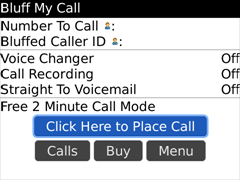
 In case you don’t remember, Bluff My Call (previously called 123Spoof) lets you make free 2 minute calls using their Caller ID Changer and Straight to Voicemail features so you can spoof caller ID and dial a voicemail directly. They have numbers around the US and Canada so its a local call. Their free version of the application makes you listen to a 10 second advertisement before your call is connected which is not bad.
A friend let me know that Bluff My Call has been updated to let you post your recorded calls to Twitter. Sadly this feature is limited to the paid version but they are also giving away free 15 minute accounts by emailing [email protected] so you can check out the Premium Edition features which add Voice Changer, Call Recording, International Dialing, Twitter functionality and more. Perfect for a few prank calls. 🙂

The app is available in the App World and at this link. Let me know what you think!

Bernard Not Registered
Posted: October 26, 2009 at 12:46 AM EST
Is this app avaliable for iPhone?
rj Not Registered
Posted: December 27, 2009 at 2:39 AM EST
I love chicken!!!