
While reading this knowledge base article on RIM’s site I ran into a bit of a snag. You can read what I mean below:
Important: HTML content cannot be created when forwarding, replying to, or composing a new email message.
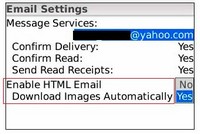 So how long will it take for us to be able to send emails that are not in plaintext. The reason this is such a problem is because it makes it obvious that you are sending the email from your BlackBerry.
So I guess that means no HTML email originating from your Berry anytime soon.
On the other hand BIS 2.5 does bring support for VIEWING:
- Graphics and photos, including the following:
- Embedded images and tables
- External images
- Active hyperlinks
- Paragraph formatting, including the following:
- Numbering
- Bulleted lists
- Justification
- Indentation
- Font formatting, including the following:
- Font type
- Color
- Size
- Effects (italics, bold)
If you find that embedded images are not downloaded automatically follow these instructions.
The pain is that external images still require you to click on the menu button and select get images. I guess this is because many spammers check to see if you have downloaded the images in their emails.

Lance G. Not Registered
Posted: June 30, 2008 at 9:13 AM EST
I don’t know if anyone else is having this problem, but I can’t Use Empower HTML Email View Pro anymore. When I get an email, I can’t see it until I hit menu, show html version or whatever. I guess this new bis 2.5 is alright though. im using 8320 fyi.
Nikolaus Not Registered
Posted: June 30, 2008 at 10:26 AM EST
After this weekend’s BIS upgrade nothing has changed for me. I’m using at T-Mo 8320 and I thought this weekend’s upgrade would allow me to view HTML e-mail on my 4.5.0.46 OS. I don’t see any of the options like in the Screenshots that Ronen has posted. I don’t have any E-mail Settings to enable HTML e-mail. Can anyone tell me why?
Ro Not Registered
Posted: June 30, 2008 at 11:40 AM EST
i have os 4.5.0.37 I also resent my service book to my device after the upgrade but still no help i have all the settings correct and when I select get images from menu option still no images if anyone can help it would be appreciated thanks.
connie Not Registered
Posted: June 30, 2008 at 12:41 PM EST
i have os v4.5.0.37 on AT&T i resent my service books this morning and sent some HTML emails to test it. it is working but there are definitley some glitches still. the emails dont load properly but there is color and images. it is still pretty exciting to see improvements! slowly but surely…