
Gadget of the week is a new column that reviews available technologies that may be more tangentially related to BlackBerrys than what you regularly see on BerryReview. The focus for the column is the BlackBerry lifestyle–making everyday life easier and more efficient by employing simple-to-use and hopefully affordable technologies. If you have any suggestions for upcoming articles let us know!
Gadget of the Week: Pulse Smartpen
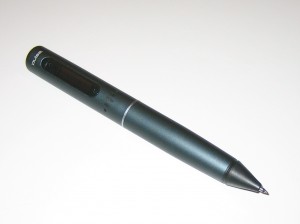 Promises: Computers and Cell phones are becoming the norm in note taking, but sometimes there is no replacing the old fashioned pen and paper. The Pulse Smartpen promises to keep the charm of handwriting while adding the convenience of several technological innovations.
- The Smartpen creates a near perfect copy of everything you write in your notebook. Whether you are writing full sentences, mathematical equations or doodles, the Smartpen creates a perfect copy of it all and stores it in the pen’s memory.
- The Smartpen can record audio and organize it according to the corresponding contemporaneous written portions on the paper. So when dictating a meeting or lecture, your imperfect notes correspond to the original audio–giving you a quick way to correct any mistakes or deficiencies.
- The LiveScribe Desktop software allows you to word search your sloppy handwritten notes as if they were a regular text file.
Summary: The Smartpen makes many promises and delivers almost perfectly on all of them. When the pen is on and you are writing in the Livescribe notebook, the pen records almost everything you put on the paper–missing only the strokes that weren’t made with enough force onto the paper (probably one of those things perfected with prolonged use). Recording audio is simple, just tap the record button at the bottom of the page. To replay part of the recording, tap the pen on the writing temporally correlated with the desired audio. The recorded audio is generally clear and understandable despite the moving writing pen and the distance of the speaker. While the LiveScribe desktop software does not convert your notes into computer readable text, it does allow you to search your notes as if it was. The program is actually quite accurate if your notes are even remotely legible. Put simply, this pen allows you to utilize all the freedoms of handwriting, without having to sacrifice the conveniences of the digital age. With the Smartpen writing by hand simply doesn’t have to be accompanied by the regret of having to re-type your notes again later for computer storage.
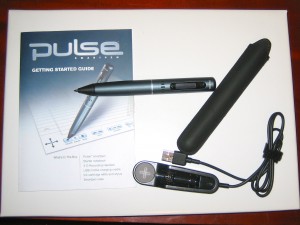 Setup & Learning Curve: In setting up the Smartpen I took a few minutes and trusted the guides to teach me what I needed to know. The included literature was almost all I needed to understand the pen. To use the included notebook I had to go to the Livescribe website and watch the demo video. Once I knew how to use the pen I downloaded the software from the Livescribe website and took a few minutes to figure out how to sync the pen and search the text. This was the hardest part and something that your mom might need help setting up. But once setup, using the pen requires almost no time for a learning curve. Simply turn on the pen and start writing on the paper, it is all recorded. If you want to record audio, just tap on the record button on the bottom of the page. To replay the audio, tap the pen on the associated writing. Plug the pen into the computer and open the software and the notes and audio are automatically transferred to the computer and indexed for searching. From the software you can export the audio, print your notes to a printer or save your notes as a pdf. Using my mom as a measuring stick for usability, I think with simply a few minutes of coaching, I could get my mom (a woman who uses uses the search and peck method of typing) to use this pen without problems.
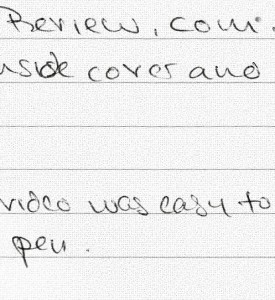
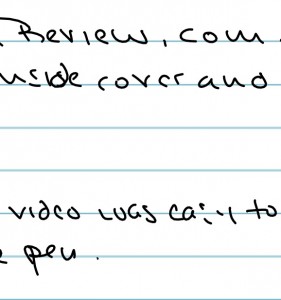 Quality Difference: When it comes to handwriting, the only alternative to the Smartpen is scanning a handwritten sheet of paper. But when scanning a paper you notice the difference. The scanned paper is harder for the eyes to read because of the subtler contrast between background and writing. In contrast, the Smartpen’s record is crisper, with a clear distinction between markings and the background paper–the pen marks stick out. On the flip side however, the scan picks up every mark that is on the paper, whether a light scribble or a harsh line. The Smartpen on the other hand, only really picks up strong strokes, missing some of the lighter marking when writing. This is the one area where a user may have to learn to write differently in order to properly use the Smartpen–to make stronger and more purposeful strokes.
Caveats: The smart pen only works with special dotted paper. The unit comes with a 1 subject notebook with 100 sheets of the dotted paper. But if you wind up liking the Smartpen as much as I did, you might start worrying about purchasing these notebooks and whether you will always have one around when needed. With that said, the Livescribe website sells notebooks starting at $7.95 and allows you to print out your own dot paper for free. Another finite resource is the ink cartridge. The Smartpen comes with 2 ink cartridges. A 5-pack can be purchased from the Livescribe website for $5.95.
Final Verdict: For a professional who must adapt to different settings, the Smartpen seems like the perfect addition–letting you take handwritten notes and record audio in meetings without the interference of a computer. For the student, the Smartpen assures you that you never miss a point in the lecture. If your notes seem deficient, you can always replay the lecture associated with that part of your notes and see what you are missing. The pen is back, and its better than ever.
Update: LiveScribe just announced a new 4gb version of the Pulse Smartpen. With the updated storage you can store up to 400 hours of audio. Also, LiveSribe pens now come in titanium color.

Kal Not Registered
Posted: October 7, 2009 at 3:39 PM EST
Great review. Just want to echo the comments and say that I’ve been using the pen for a year now for my engineering classes here at UC Berkeley and absolutely love it. It’s so useful to study as I literally never miss a word!
Kal
ps. I used the code LS05DSC451 when I got the pen at livescribe.com/store. Think it took like 5% off. Hope that helps!
Mike Not Registered
Posted: October 7, 2009 at 4:04 PM EST
Wow. Great review. Not as lengthy as your last and now i actually wanna go buy one myself!
Heather Not Registered
Posted: October 7, 2009 at 8:41 PM EST
I have been using this pen for just over a month now and I absolutely love it. I had been looking for something that would import my notes to the computer for a while but did not want to give up the “pen and paper” concept. I write all of my work notes in pen and even do diagrams and never had a way to share with my co workers as I work remote. This pen was my solution and even had benefits that I wasn’t looking for such as voice recording. The software is very simple to use and I really like that I can upload to the website and allow specific people to view specific pages. I have found the imports to be very accurate to my actual handwriting as well.
I purchased mine from costco.com and received extra notebooks and pen refills for less than what it was being sold for elsewhere. The price decreased from the manufacturer a few days after I made my purchase but even with the drop I still got a better deal from Costco.
This is a great investment for anyone who still wants to use a pen but is living in the digital world. I can only imagine the benefits of having this when I was in college.
Duckman Not Registered
Posted: October 8, 2009 at 8:40 PM EST
It’s a good product, but to provide a more balanced review you should mention other shortcomings:
The word recognition only works if you buy a monthly subscription to their online OCR service.
And the desktop software leaves a lot to be desired: it’s a complete resource hog and trivial things like backing up a notepad are needlessly complicated.
David S. Not Registered
Posted: October 8, 2009 at 9:23 PM EST
Duckman, I used the free software available from the LiveScribe website. The software didn’t convert the writing to text, but the writing is searchable even without the conversion. Plus, I didn’t have any issues with the software. But thanks for sharing your experiences.
Brad Not Registered
Posted: October 12, 2009 at 5:53 AM EST
I love the Pulse pen & system as a consumer product, but it just doesn’t cut it for a business application. The digital pen system really comes into it’s own when used as a business app that allows users to complete paperwork in remote locations and send that data back via Bluetooth to a mobile device and then GPRS through to your back end system where it can be integrated to a database.
So if you are looking for a business product, check out the offerrings that out there.