
 When we mentioned that RIM updated their suite of instant messaging applications to version 2.5 there was one feature that really stood out. The ability to add a dedicated homescreen icon for a specific contact. This icon always shows their current status and their current avatar. I started using it for my wife but I cannot imagine having more than one.
One of the questions we kept on hearing was how do you actually setup these dedicated homescreen icons. To experienced users this may be a no brainer but we got asked a few times so its not that obvious.
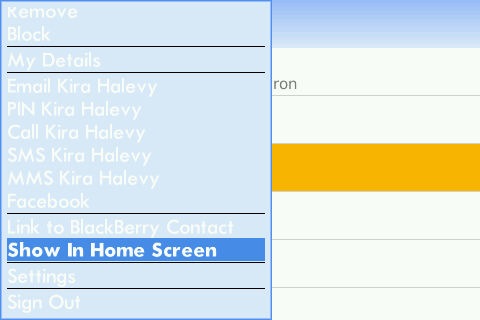
To add a dedicated conversation shortcut to your homescreen
- Install and sign into the IM v2.5 client of your choice
- Hover over the contact you wish to add to your homescreen
NOTE: if you highlight a active chat it will not work. You need to highlight the actual contact. You can do that simply by searching for their name. - Hit the menu button and select the option to show in homescreen
- The homescreen icon is supposed to appear in the same location where the IM client icon is but that is not always the case. Mine showed up in the downloads folder and some other people had it show up in the IM clients folder.
- To remove the icon just hover over it and click remove from homescreen
Let us know if you have any questions!

jeff Not Registered
Posted: September 25, 2009 at 2:08 PM EST
Make sure when you are trying to remove the icon that you actually select “Remove from homescreen” because delete will delete the application from your device.
Nikolaus Not Registered
Posted: September 25, 2009 at 2:43 PM EST
I’ve noticed these go away on their own. I created 3 the day I heard about this, and had to add them again the next day because they were gone.
Also not sure if this was talked about but BBM 5.0.8 gives you the same ability to do this, and that one seems to forget the person’s headshot to display and reverts on its own to just the generic cartoon head after a while. Anyone else find this??
Brandon Not Registered
Posted: September 25, 2009 at 3:18 PM EST
It looks like you lose the headshoot when you reboot.
I so keep having to remove and readd the wive from my screen.
Having her there makes me happy.
Belutz Not Registered
Posted: September 25, 2009 at 4:20 PM EST
After installing IM v.2.5, the IM field in Contacts is missing by default. It only shows when you’re online with the IM application and the particular contact is online.
This is a drawback, because I usually store some people IM without actually adding them in my IM 🙁
I hope RIM will make the IM field back again by default in Contacts