
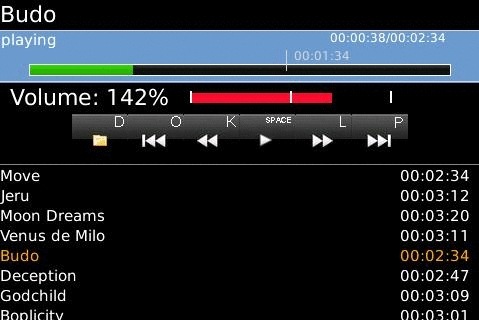
 The team behind the awesome Wi-Fi File Transfer for BlackBerry app have released another hit. Their new app VLC Remote Control lets you control your VLC Player over Wi-Fi. In case you are not familiar with it VLC is the most powerful and FREE video player for Mac and Windows. It will play practically any video you throw at it though sadly it is not that great with music playlists.
VLC Remote Control lets you control your VLC instance from your BlackBerry over your homes Wi-Fi network. I have been playing with the app for a few days and am loving it since I use VLC all the time. The only caveat is that it is only available for the BlackBerry Bold right now but hopefully support for more devices is coming soon!
It will not replace my trusty Adesso 2.4GHz wireless HTPC keyboard with optical trackball but it will definitely be useful for pausing Penn & Teller while I am eating breakfast. Or just drive my wife batty while she is watching her Kundalini Yoga video on our HTPC. 🙂
Setup:
(For detailed instructions, visit us at: ChocolateChunkApps.com)
-Make sure that the PC/Mac running VLC, and the BlackBerry are on the same WiFi network
-Activate the web interface in VLC
-Start up VLC remote, and enter the PC/Mac IP address – you are now connected!
Features:
- All standard media player controls (play/pause, next/previous, Fast-Forward/Rewind etc)
- Click-and-Scan through media using the BlackBerry trackball! Perfect for scanning through long movies.
- Change the volume using volume keys on side of device.
- Browse PC/Mac file system in real time (including external drives) and add to playlist instantly.
- Select from real time on-screen playlist to switch tracks/video.
- Save multiple VLC connections (home, office etc)
- Some features and shortcut Keys (these features can all be accessed from non-shortcut menus, buttons etc as well):
- Previous/Next track: o/p
- RW/FW skip: k/l
- Play/Pause toggle: space bar
- volume: Blackberry volume control on side of device
- Mute toggle: m
- Browse computer hard drive: d
- Add to playlist: a
- Add to playlist and play: p
- Full Screen mode/Minimize mode toggle: f

Jan Not Registered
Posted: August 4, 2009 at 12:07 PM EST
It’s running sweet on my Curve 8900 😉