
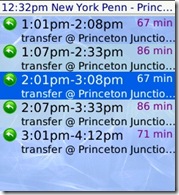
 Trainlogic let me know about their product TrainSchedule GPS Edition which looks pretty interesting. It has train schedules for quite a few US trains and offers it in a mobile friendly version. TrainSchedule is a subscription application for which you have to buy a 3 or 6 month plan. Its not terribly expensive at $3.75 for 3 months and $7.50 ($6.50 sale now) for 6 months but still I doubt I would be willing to pay a monthly fee. I take these trains quite often and it would be useful but nothing I could not find online, through Google Maps Transit, or by just carrying around a schedule. On the other hand I usually just take the NYC subway which does not even have a schedule.
Features:
- includes a powerful trip planner
- combines many railroads into a single network
- works everywhere: in subways, tunnels, in places with no signal
- easy on your data plan: stores downloaded schedules locally on your phone
- includes trip and stop maps
- fast and easy: great for everyday train commuters
Full description and cities/lines covered after the jump:
TrainSchedule shows schedule information on upcoming trains for the next 14 days (taking into account holidays, special days etc.) and also includes a railroad trip planner. Optionally (provided your phone has a GPS capability) it lets you track yourself while on the train to find out if your train is delayed.
A number of train schedules on the U.S. East Coast, Chicago area and California are combined into a single network. Select the train lines you are interested in, then the corresponding schedules are downloaded and stored locally on the phone. It is fast and easy to use. Finally, it is a powerful tool that can help you find the right train or connection when it’s not obvious.
Schedules available with this product:
Nationwide:
* Amtrak NYC – Washington, DC
* Amtrak Boston – DC – Newpport News
* Amtrak Springfield – Washington, DC
* Amtrak Empire Service (Northeast)
* Amtrak Pacific Surfliner (California)
New Jersey & New York:
* All New Jersey Transit lines (including the Atlantic City line)
* PATH
* All NY Waterway Ferry between NJ and Manhattan
* Hudson-Bergen Light Rail
* Newark Light Rail
* River Line Light Rail
* AirTrain (Newark Airport)
* Atlantic City Express (ACES)
New York & Connecticut:
* Long Island Rail Road
* MTA Metro North (east of Hudson)
* Staten Island Railway
* Shore Line East
* AirTrain (JFK Airport)
Pennsylvania:
* All Regional Rail SEPTA lines
* SEPTA Subway and Route 100 High-speed rail line
* PATCO
Massachusetts:
* MBTA (rail)
Chicago/Indiana:
* MetraRail
* South Shore Line
Maryland & Virginia & Washington, DC:
* MTA Maryland MARC Train lines
* Route 200-Light Rail
* Virginia Railway Express
* WMATA Metrorail
Florida:
* SFRTA Tri-Rail
* Miami-Dade Transit Metrorail
Texas:
* Dallas Area Rapid Transit
California:
* BART (Bay Area)
* Caltrain
* Metrolink (South. California)
* Sacramento Light Rail
* Altamont Commuter Express
Oregon:
* Trimet (Portland)
Washington:
* Sound Transit
* Tacoma Link

David Levine Not Registered
Posted: August 4, 2009 at 9:29 AM EST
I agree that I can’t see paying a monthly fee for this. I take trains from Northern NJ to NYC daily and I have a small text file that contains the times. When they change every 6 months or so I check to see if any of the times change and adjust if needed, thought often an updated schedule doesn’t mean times for trains, especially around rush hour, are changing.
If you use varied trains on a very frequent basis, maybe not having to have the schedules and keep them updated with you might be a bit more convenient, but I would imagine those individuals that would benefit are few and far between.
Nice idea, but I’m not sure how relevant it is to the masses.
Barry Engel Not Registered
Posted: August 4, 2009 at 11:33 AM EST
Great thoughts, David.
Based on our market research we have learned that simpler is better and even going through the effort of creating a text file as you have is too much for many folks.
I think the benefit of knowing it is always up to date, has connections between services (e.g. take a train from Maplewood to JFK) and no internet connection required is worth it. Many of our customers pay $100-$300 a month for train service so it’s not too much to add.