
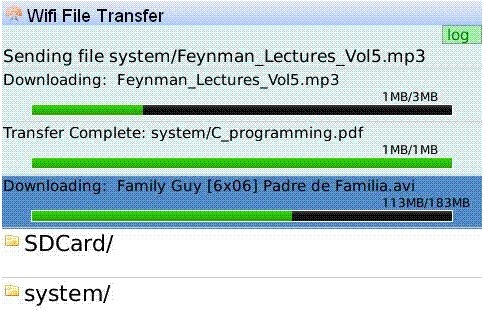
 We mentioned the slick WiFi File Transfer application a bit back but then it was only available for the Bold. The developer let me know that it now supports all Wi-Fi capable BlackBerrys with OS 4.5+ including the 8900 Curve, 8320 Curve, 8820… Though I am not sure about the 8220. Storm support is out because it does not have Wi-Fi.
This application simply lets you copy, rename, and delete files off your BlackBerry from your desktop browser. They have a free lite version that has all the features except that delete, rename, & create directory are disabled.
I definitely recommend checking the app out if you have a Wi-Fi device. The free lite version is at this link and right now the full version is going for $9.99 which is not bad considering other apps in the category.
From the description:
Wi-Fi File Transfer for BlackBerry allows the transfer of files from a PC or Mac directly to your BlackBerry over Wi-Fi using your browser. No need for Desktop Manager, Media Manager, USB drivers or any other 3rd party applications: Just a BlackBerry Bold, PC/Mac with browser and a Wi-Fi network.
What you need:
- A BlackBerry Wi-Fi capable device with OS 4.5+ with Wi-Fi File Transfer installed.
- A PC or Mac with browser
- A Wi-Fi network.
Get Started:
- Make sure your device and PC or Mac are on the same Wi-Fi network.
- Start “Wi-Fi File Transfer” on the device. An IP address will be shown.
- Type this IP address into the PC or Mac browser and start browsing your BlackBerry! Upload and download files directly from the browser.
Features:
- View the BlackBerry file system from the browser and transfer any files to and from device internal memory (900Mb for BOLD) or SD card. Turn your BlackBerry into a memory stick!
- Upload movies, pictures and music directly to your BlackBerry and view them with the BlackBerry device Media Player.
- View and play pictures, music, PDF files etc. stored on your BlackBerry straight from the browser.
- Browse, rename, delete, and create new folders on the BlackBerry from either the browser or the device application itself.

Andrew Not Registered
Posted: June 24, 2009 at 10:27 AM EST
That is fantastic – for disgruntled Mac users this is a no brainer.. If only RIM were as clever as the people developing for them….
Corinne Not Registered
Posted: June 24, 2009 at 11:07 AM EST
It works, but I’m not willing to spend $10 for the app and you’d have to in order to try out the actually useful features.
All this app does is make me look at my itouch and think that it does more than my blackberry when it comes to certain things.
Jason Not Registered
Posted: June 25, 2009 at 3:12 AM EST
Not advertised, but works on Ubuntu and FireFox (at least the light version).