
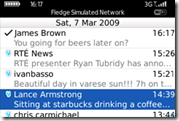
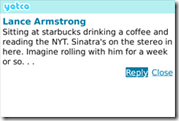
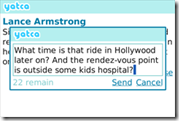
Josep let me know about this slick new free Twitter client for OS 4.6+ BlackBerrys. Yatca takes a RIM like approach for their Twitter client that I totally love but requires OS 4.6+ for it to work. It essentially ties itself directly into your messages application so that your Twitter notifications show up in your messages folder. It also is tied into the native profiles so you can set a different notification profile for Yatca. Oh and by the way Yatca stands for Yet Another Twitter Client Application… 🙂 I can see quite a few people including myself loving the new integration options of this app.
Homepage: yatca.wordpress.com
OTA install link: bit.ly/yatca101

NOTE: This app will only work with OS 4.6+ devices. Please do not install on older devices.

Simon Sage Not Registered
Posted: March 16, 2009 at 9:45 AM EST
Nice. This is a great option for those of us in Canada who can’t get tweets by SMS anymore. Twitterberry was nice, but since it didn’t plug into the messages folder, it was a little weak. I still spite the Facebook app for not already doing it, but 1.5 looks like it’s coming soon.
Don’t know how I feel about the “yatca” name, though. Would much rather see a bunch of “t’s” in my messages folder instead of “y’s”.
Astral Weeks Not Registered
Posted: March 16, 2009 at 9:56 AM EST
I have the indicator but nothing in my message folder. Help!
Osman Not Registered
Posted: March 16, 2009 at 10:31 AM EST
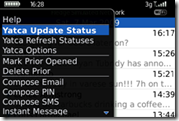
they are some on the bottom of the messeges list.. hover over a date and click menu – mark prior opened
itll reset so 0
tim Not Registered
Posted: March 16, 2009 at 11:04 AM EST
doesnt do anything, tired, it happened when i used twitterberry to send a tweet.
maybe with an update this will work better…and a name and logo change
tim Not Registered
Posted: March 16, 2009 at 11:31 AM EST
and by tired i mean tried
Osman Not Registered
Posted: March 16, 2009 at 11:45 AM EST
its working like a charm for me..
I just wish i could add ppl to my following list on the phone
Oo Not Registered
Posted: March 16, 2009 at 11:04 AM EST
i tried this yatcha and i love it, it’s easy, and you don”t have to switch between one icon to another,
if only the message enter in to my twitter email folder instead of message folder. it’ll be easier to check new tweet.
conedude13 Not Registered
Posted: March 16, 2009 at 11:07 AM EST
Sounds great, too bad i’m on my curve. installing error says i need net_rim_bbapi_messagelist in order to install. booo!! 😛
kim Not Registered
Posted: March 16, 2009 at 11:45 AM EST from my BlackBerry 9000
Same problem-I get the indicator icon, and my LED is blinking, but I don’t have anything in my message list.
mikepags Not Registered
Posted: March 16, 2009 at 12:58 PM EST
are you sure that youre checking the Messages app and not a specific email account icon?
I installed on my Storm running 113/114 hybrid and it worked right away (no reboot, etc).
kim Not Registered
Posted: March 16, 2009 at 1:02 PM EST from my BlackBerry 9000
Yeah, I’m sure. My inboxes are combined. I tried seperating them-didnt work. I’ve reinstalled and tried multiple battery pulls.I’m on a bold.
Ems5000 Not Registered
Posted: March 16, 2009 at 2:24 PM EST
Go to view folders… then scroll down to yatca in your option box.
TferThomas Not Registered
Posted: March 16, 2009 at 7:13 PM EST
Hey,
A neat and tidy application & integrates well with the Messages folder, which I could see some people would find this very helpful, but with over 1700 friends, the Messages folder becomes very crowded, very quickly. Tried the application last night, but a separate application works best for me, as for me, it is good to be able to separate twitter from my 7 email addresses.
The name stands out and with the “correct” colour (blue for twitter) is is instantly recognisable as a twitter application.
Congratulations, but I shall stick with SocialScope and use twitterberry on occasions.
TferThomas
ian Not Registered
Posted: March 16, 2009 at 11:02 PM EST
NEW VERSION COMING TMR
kim Not Registered
Posted: March 16, 2009 at 11:19 PM EST from my BlackBerry 9000
New version already? Sweet! Will it include the pic feature?