
 Review: Notes2Self
[Rating:6] 6/10
Website: PocketInformant.com
Cost: $9.95
At first I was a little skeptical about a 3rd party voice memo program but decided to give it a go. Many people will be served just fine with the built in voice recorder in OS 4.3+ if they have it. Once Notes2Self was downloaded, I noticed 2 icons on my BlackBerry. One was the program itself and the other (with the little wrench) was the options/settings. I didn’t like the fact that the program installed 2 icons onto my BlackBerry and would’ve benefited to have the options/setting set into the program like any other application.
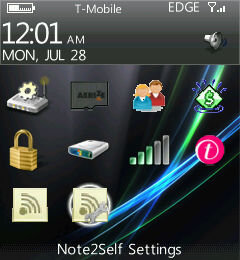
Go into the setting menu and you’ll notice that the “send to” email is set for the Notes2Self generic email. It took me a minute to realize that my email address was supposed to go there. You can choose to send via an Email Message or WebIS Web Service on the “Send Via” drop down. The WebIS Web Service is a sending service that you have to register for at the website (http://webis.net/products/notes2self/N2S_Signup.php) but I think that your email is sufficient enough. That is unless you have issues with large emails being sent from your device. I recommend that the Subject line stay exactly the way you see in the picture. It makes it easy to read when the email comes through. The next drop down option is the Notes Format. You can choose PCM or AMR. You also have the ability to set a completion sound to play once the email comes in. You can have the program play the sound or not simply by clicking on the “Play Sound” box.

Once your settings are to your liking, you can start sending yourself messages. Click on the Notes2Self icon that does not have the tiny wrench. As soon as you get into the program, you are already recording (with a slight few second delay). Send your message by hitting the green “Send” button and you can cancel by hitting the red “End Call” button.
Click on the Notes2Self icon and within a few seconds, it will automatically begin recording. Leave yourself a little message and then press the green “Talk” button to send your message which also takes a few seconds. You will receive your message within a a minute or two.
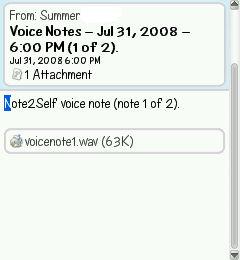
After playing with it for a few days, I was initially ready to give it a not too great rating due to the fact that it can take a bit to start the program and send the message. As far as I was concerned, it would’ve been easier to get a pen and write the information on my hand. But then I actually needed it to remember a few things that I needed to get done. Upon this revelation, I think that Notes2Self would be a decent program to have. Its not something that someone would use all the time but for a few times a week thing, it would be good. Otherwise the built in voice recorder in OS 4.3+ should be good enough. You can get a Notes2Self trial at PocketInformant.com for and if you like it, the full version is only $9.95

Lance G. Not Registered
Posted: August 11, 2008 at 8:13 AM EST
Pointless App., Vlingo already does this for free. Sorry Guys :(.
Summer H Not Registered
Posted: August 11, 2008 at 10:39 AM EST from my BlackBerry 8120
Very true. Vlingo is free and can do the same. I’ve tried Vlingo, and IMHO, Vlingo was never as accurate.
haggisgirl Not Registered
Posted: August 11, 2008 at 11:12 AM EST
I prefer Note2Self over Vlingo. Note2self is a recorded message you send to yourself (or someone else) that takes two button presses to accomplish and can be done in the amount of time it takes you to speak your note. I could never get Vlingo to transcribe accurately what I was saying and it took too much looking at my Curve to be safe while driving. With Note2Self activated by my left convenience button, I can press the button, record my message to myself, press the send button and its done, all while never taking my eyes off the road while driving.
arbibreMeelry Not Registered
Posted: December 24, 2008 at 2:52 AM EST
Предлагаем Вам приобрести Современное Быстрое Удобное средство,
повышающее потенцию – Самоклеющийся АППЛИКАТОР ЭРЕКС,
сертифицирован, доставка по Москве, Спб – в день заказа, регионты 1-5 дней
Телефон для получения более подробной информации и заказов: +7 (495) 2298516