
SnapScreen, the on device screenshot utility, recently got a 9.5/10 in a review by Nathan. His two complaints were that you could only save large BMP files in OS 4.2.2 and the long random file names.
Well VirtualViews has turned around and addresses both issues in one version release!
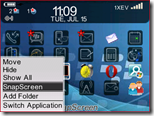 You can now save on device screenshots as JPG, PNG, & BMP files in OS 4.2.2+. This used to be limited to OS 4.3+ but somehow they got it to work.
- The files are now saved in a logical format based on MMDDYYHHMMSS

Very nice work on VirtualViews part that shows the benefit of letting vendors know how they can improve their products.
You can pick up the latest version of SnapScreen OTA at this link or you can purchase a copy for $6.99 at this link.
