CallLogger – Save Your Call Logs To Your Calendar
Thanks to Perry for sending this one in. Just in case your calendar was not already crammed full of items… CallLogger automatically logs all of your calls to the BlackBerry calendar with the call number and length. It also adds the notes you take during the call to the calendar notes field.
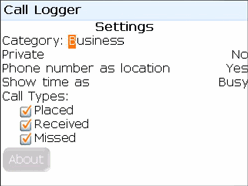

They even offer a free Outlook plugin to categorize your calls differently in Outlook. All in all I think it is a pretty interesting and unique application.
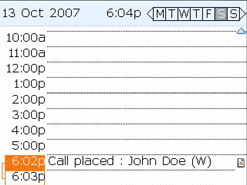

There is a 7 day free trial and you can pick up the full version for $7.99 at this link
Features:
- Keep track of phone calls including time spent on the phone and who you called. Perfect for consultants, lawyers, or anyone in professional services who needs to keep track of time or document communications.
- Call Logs can be assigned a category in your Outlook® calendar.
- Keep track of missed calls.
- Keep track of who you communicate with utilizing calendar search.
If you enjoyed this article, make sure you subscribe to our RSS Feed to stay on top of the latest BlackBerry news you can use.
Previous Post: MetroLyrics.com – Mobile Lyrics On Your Berry! »
Next Post: OS 4.5 & MP3 Attachments – YouMail Users Rejoice »
If you liked this article, you might find these interesting:
- myCallLogs Released – Save Call Information & Duration To Your Calendar
- Call Notes – Add Call Notes To Your Calendar Or Tasks
- Memory Eye: Monitoring Low Memory to Save Call Logs & Email Pruning
- Call Client: Free Phone Call Manager From SimpleLeap
- Momentem Call Tagging & Expense Management – Free Call Time Tracker Also Available
Latest Articles:
- EA Games Shows Off OpenGL in Need For Speed Shift
- RIM Getting Rid of Annoying Registration Form for Every Download
- BBDC – Dash Mobile Launching App January 2009 in US & Canada
- Loopt Releases Update – Adds Background Location Updating

