
You may remember back in February we told you about a software called EZ Reregister. It allows you to store the names, registration codes, and vendor email addresses for all of your third party software. It stores all of this information in one convenient place so that when you change devices with one click you can generate email messages to all of your vendors to request registration codes for your new PIN.
The Online version of EZ Reregister is now available. You can log into your account from the web browser of any Operating System, including the native Blackberry Browser. This was something that the original version struggled with but the new version is accessable from your BlackBerry browser.
No data is stored on the Blackberry itself, everything is handled server-side. Even if your beloved Berry gets run over by a Mack truck, you can login and use your new PIN to reregister your software.
The subscription term for the Online version is 1 year (expires 1 year + 1 day from date of purchase). The one year subscription cost is $7.99 which is pretty cheap if you switch devices often. 
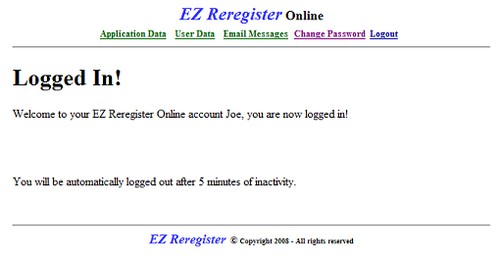
How does the Online version work? Once you purchase the subscription you’ll be redirected to the registration page. Enter your PIN, first and last name, email address, and create a user name and password for logging on. Once you are logged in, from the links at the top of the page, you can select Application Data, User Data, Email Messages, Change Password, and Logout.
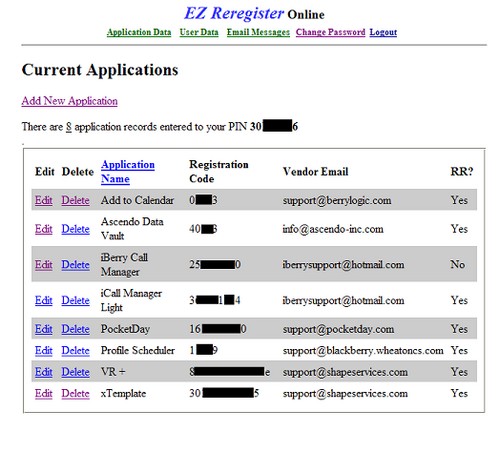
Once the Application Data page is displayed, click on the “Add New Application” link to add a new record. Your Application Records are displayed 8 per page, and you can either Edit or Delete any record.
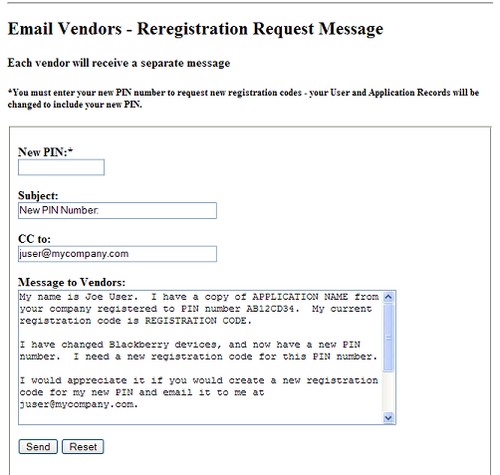
Clicking on the “Email Messages” link allows you to send a test message confirming you can communicate with the vendors, or to enter your new PIN and request new registration codes. The messages are populated with your specific application information.
For more info on EZ Reregister Online, visit the login page to find some more info. You can also find a link there to subscribe. http://ezreregister.com/ezo/login.php
Since EZ Reregister Online is going to be the featured offering for EZ Reregister, the price of the Windows Desktop version has been permanently reduced from $12.99 to $9.99.

Pat Not Registered
Posted: June 11, 2008 at 12:40 PM EST
I’ve been using the software since it’s release. Very useful, esp. for those of us changing devices fairly often. A subscription service seems to be the next best thing from EZReregister.
Not clear on comment “original version struggled”. I haven’t had any problems with it. True, the subscription enabling me to use from my Blackberry will make it that much easier.